Ghost Mastery
Build your site with Ghost.
I will show you how to build a Ghost website, publish a newsletter, and offer paid memberships.
I build Nimble Sound, a fictional music publication, throughout the lessons. Follow the same steps to build your own site.

Taught by Dave Swift
- 7 modules
- Self-paced
- Lifetime access
- Ghost Pro or self-hosted
- 30-day refund
- $49.00 once
- Seven modules from first login to memberships and newsletters
- Self-paced video lessons you can replay anytime
- Build-along with a fictional teaching site (Nimble Sound)
- Lifetime access to the course
- 30-day money-back guarantee
If for any reason you’re not satisfied with Ghost Mastery, I’ll issue a prompt and full refund within 30 days. There’s only ONE condition: you have to tell me the main reason you weren’t happy with the product, so I have a chance to make it better.
Sample lessons
Build along with Nimble Sound
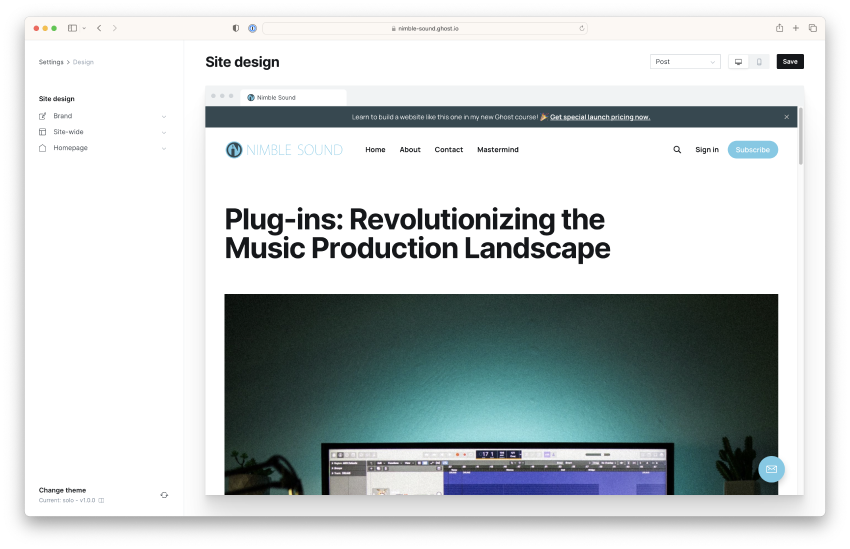
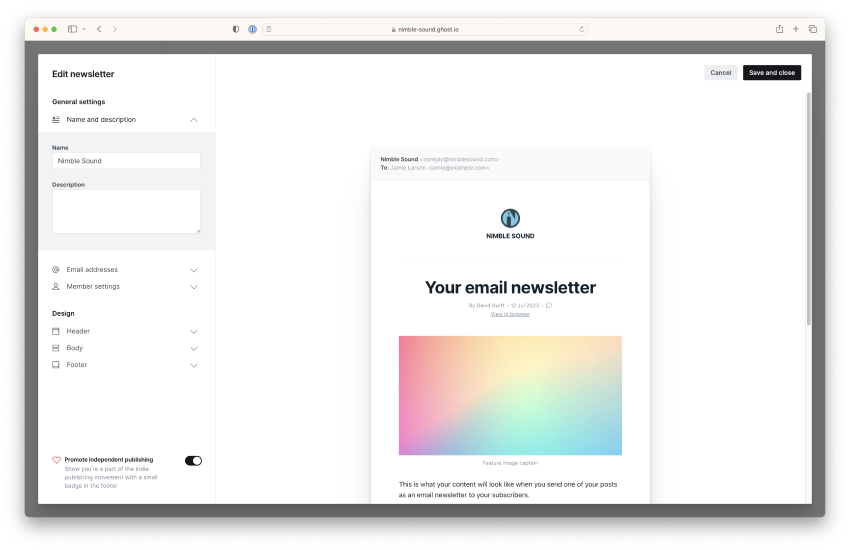
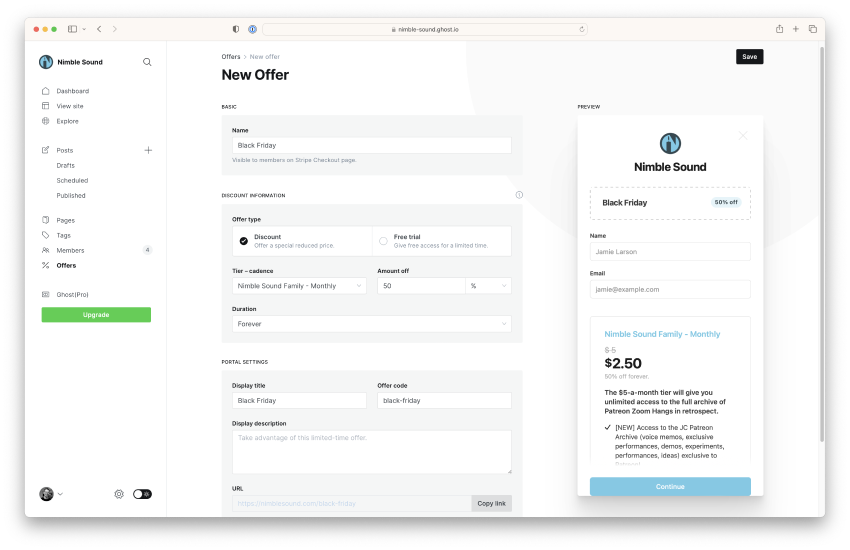
Inside the course we use Nimble Sound, a fictional site for a creator in music production. You follow the same steps on your own Ghost site.
You will set up design and navigation, publish posts, configure memberships, and send email — the same jobs most independent publishers need.
Is Ghost a fit for you?
Ghost helps you publish, email your list, and charge for memberships. It is not a shopping cart and not an online course platform like the one you are reading this on.
Ghost could replace a WordPress membership stack, or Patreon/Substack-style recurring support, if publishing and email are the center of your work.
Server installation is a separate skill — covered in my Self Host Ghost course if you run your own VPS.
Who this helps
Bloggers and publishers
Ghost is built for writing and fast pages. The editor stays out of your way when you publish.
Creators selling access
Membership tiers, protected posts, and Stripe connect inside Ghost — without stacking extra plugins.
Writers leaving bundled platforms
If you want your site, your list, and your members in one place you control, Ghost is worth a serious look.
What each module covers
Module 1
Up & Running
How Ghost fits together, hosting choices, and a full tour of the admin panel so you know where everything lives.
Module 2
Site Appearance
Themes, typography, navigation, and design tweaks from the admin — including custom CSS when you want it.
Module 3
Website Configuration & Settings
Domains, SEO and social settings, staff accounts, and author pages.
Module 4
Creating Content with Posts & Pages
The Ghost editor: cards, images, pages vs posts, tags, and forms.
Module 5
Monetizing with Memberships
Portal, tiers, protected content, comments, and a sales page for a higher-ticket offer.
Module 6
Email Newsletters
Send from Ghost, import subscribers, and basic deliverability habits.
Module 7
Advanced Features & Concepts
Integrations, imports, redirects, and an introduction to theme customization.
Full course outline
Show full course outline
Up & Running
- Using Ghost – Quick Tour
- Ghost’s Business Model
- Ghost Pro Sign-up Flow
- Welcome
- Module 1 Action Steps
Site Appearance
- Ghost Design Options Overview
- Design Settings – Casper Theme
- Changing Themes – Solo Theme Tour
- Adding Custom CSS (Even if you don’t know CSS)
- Using ChatGPT To Write CSS For You
- Adding Google Fonts to Ghost
- Adding Navigation Items
- Announcement Bar (AKA Hello Bar)
- Stay Organized with CSS Comments
- Module 2 Action Steps
Website Configuration & Settings
- Add a Custom Domain Name to Ghost Pro
- General Settings – Important SEO & Social Media Options
- Adding Staff & Improving Author Pages
- Module 3 Action Steps
Creating Content with Posts & Pages
- Managing Pages & Posts
- The Difference Between Pages & Posts
- The Ghost Editor – Cards & Markdown Explained
- Image Editing
- Post Settings
- Publishing Options
- Why Primary Tags are So Important
- Tagging: Best Practices and Content Organization
- Adding a Contact Page
- Adding a Form to Your Contact Page
- The Ghost Comment System
- Default Publishing Settings
- Module 4 Action Steps
- Using Third-party Writing Tools
Monetizing with Memberships
- Creating Membership Tiers
- Get Subscribers with The Portal
- Creating a Welcome Page
- Creating a Sales Page for your Membership
- Creating Exclusive Content (Protecting Content)
- Member Management
- Member Analytics
- Create a Membership Content Archive
- Importing Members (Free Subscribers)
- Importing Paid Subscribers From Substack (or other stripe subscriptions)
- Creating Offers or Discount Codes
- Automated Substack Migrator
- Module 5 Action Steps
Email Newsletters
- Newsletter Settings Explained
- Getting Subscribers with Embeddable Forms
- Creating a New Email In Ghost
- Testing, Previewing, & Publishing Emails
- Cleaning Up Your List
- Email Analytics
- Create a Newsletter Archive
- Common Deliverability Issues
- Module 6 Action Steps
Advanced Features & Concepts
- Theme Customization Basics
- Add a Tip Jar
- Add Social Media Icons
- Exporting/Backing Up Your Ghost Site
- Migrating From WordPress
- Importing/Restoring Your Content to a Self Hosted Site
- Should You Self Host?
- Redirects
- Viewing Site/Post History
- Search
Purchase Ghost Mastery
$49.00one-time · lifetime
Buy this courseBuying multiple seats for a company or school?
- Seven modules from first login to memberships and newsletters
- Self-paced video lessons you can replay anytime
- Build-along with a fictional teaching site (Nimble Sound)
- Lifetime access to the course
- 30-day money-back guarantee
If for any reason you’re not satisfied with Ghost Mastery, I’ll issue a prompt and full refund within 30 days. There’s only ONE condition: you have to tell me the main reason you weren’t happy with the product, so I have a chance to make it better.
About the instructor
Dave Swift
I teach software and publishing tools on video, with step-by-step walkthroughs of sites I build and use myself.
Feedback on my teaching
“I’m a huge fan of Dave. As a boutique agency owner, his in-depth video training on the software and issues I need to know about gets me where I need to be without any fuss or fluff. His tutorial on Elastic Email for agencies is just one stellar example. Highly recommended.”
“I’ve been following Dave’s software reviews for years. Dave is by far one of the most talented software reviewers in his space. I come from a Shopify background, but I watched Dave’s WordPress for Beginners video a few years back and it was the perfect balance of information and step-by-step tutorials.”
“You’re gifted Dave. No one I know explains it better than you.”
The “one-condition” guarantee
If for any reason you’re not satisfied with Ghost Mastery, I’ll issue a prompt and full refund within 30 days.
There’s only ONE condition: you have to tell me the main reason you weren’t happy with the product, so I have a chance to make it better.
FAQ
Is there a money-back guarantee?
Yes. If Ghost Mastery is not useful for you, I will refund you in full within 30 days of purchase. There is one condition: tell me the main reason it did not work, so I can improve the lessons for the next person.
Do I need to be a developer?
No. This course is for creators using Ghost’s administration panel: the editor, design settings, memberships, and email. We do not rebuild Ghost from source, and you do not need to know Node.js.
Ghost Pro or self-hosted?
The information in this course applies to both Ghost Pro subscriptions and self-hosted Ghost. The lessons focus on the features you can reach from the Ghost administration panel. If you want a walkthrough of installing Ghost on your own server, that is the Self Host Ghost course.
I already bought the Editor Reference Library. Still useful?
Yes. The Editor Reference Library is a dip-in guide to individual cards and tools in the editor. Ghost Mastery is the full site: design, memberships, newsletters, and a build-along so you leave with a working Ghost site, not only editor tricks.
How should I work through the course?
Work at your own pace. You can follow the modules in order or jump to the lesson you need when you need it.
What about hosting costs?
Ghost Pro is a paid subscription from Ghost. Self-hosted Ghost runs on a server you pay for separately. This course does not include hosting or install fees.
Purchase Ghost Mastery
$49.00one-time · lifetime
Buy this courseBuying multiple seats for a company or school?
- Seven modules from first login to memberships and newsletters
- Self-paced video lessons you can replay anytime
- Build-along with a fictional teaching site (Nimble Sound)
- Lifetime access to the course
- 30-day money-back guarantee
If for any reason you’re not satisfied with Ghost Mastery, I’ll issue a prompt and full refund within 30 days. There’s only ONE condition: you have to tell me the main reason you weren’t happy with the product, so I have a chance to make it better.
Ghost Mastery: Building Your Audience-Driven Business
$49.00 · lifetime